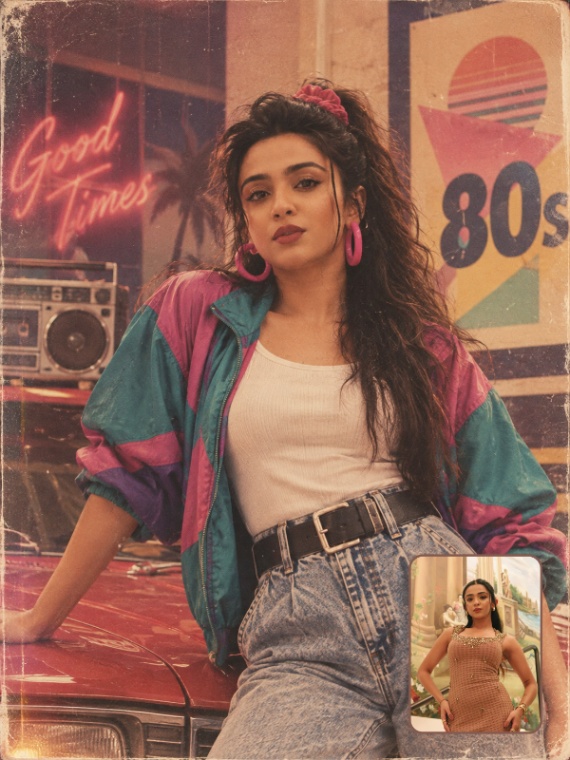
AI generated
4.4K views
2.4K copies
80s Retro Reimagined
AI Image PromptMovies
Step back into the 1980s with an authentic retro transformation. Reimagine your look with classic 80s fashion, vintage hairstyles, nostalgic backgrounds, and realistic analog film texture while keeping your unique identity recognizable.
Size / Aspect Ratio
3:43:4 Prompt
Using the uploaded reference photo as the identity reference, create a completely new photorealistic mid-1980s photograph of the same person.
IDENTITY CONSISTENCY:
Preserve the exact recognizable identity of the person from the reference image — facial structure, face shape, eyes, nose, lips, skin tone, natural facial proportions and overall recognizable appearance. Do not replace or redesign the face. The person must clearly look like the same individual.
IMPORTANT VARIATION RULE:
EVERY NEW GENERATION MUST HAVE A COMPLETELY DIFFERENT OUTFIT, HAIRSTYLE DETAILS, ACCESSORIES, POSE, LOCATION AND BACKGROUND.
Do NOT reuse the outfit, clothing combination, accessories, styling or background from previous generations.
Treat every generation as a NEW 1980s fashion/concert photograph.
1980s FASHION:
Use authentic and unmistakable 1980–1985 fashion trends. Choose ONE DIFFERENT fashion concept for every generation, such as:
oversized denim jacket + graphic tee + high-waisted jeans
leather biker jacket + fitted top + acid-wash jeans
colorful oversized blazer + pleated trousers
off-shoulder top + high-waisted skirt
vintage band-style concert outfit
sporty 1980s tracksuit
power-dressing blazer + statement belt
denim-on-denim styling
metallic/glam rock outfit
retro jumpsuit
bold patterned blouse + high-waisted trousers
cropped jacket + pleated skirt
Never combine the exact same outfit formula twice.
HAIR & ACCESSORIES:
Change the hairstyle and styling details every generation while remaining period-accurate:
voluminous feathered hair, soft waves, teased hair, side-swept hair, layered blowout, retro curls, headband, hair ribbon, etc.
Change accessories every generation:
large hoop earrings, chunky earrings, layered necklaces, bangles, vintage watch, statement belt, sunglasses, colorful bracelets, etc.
Never repeat the same accessory combination.
BACKGROUND / LOCATION:
Every generation must use a completely different authentic 1980s environment.
Examples:
1980s rock concert venue, backstage area, outdoor music festival, neon-lit city street, vintage record store, retro diner, hotel lobby, arcade, subway entrance, beachside promenade, shopping street, old cinema entrance, rooftop party, music club, vintage car parking area, or city nightlife.
Never reuse the same background or location from a previous generation.
POSE & COMPOSITION:
Change the pose and camera composition every time:
standing, walking, leaning, sitting, candid side glance, looking toward the stage, holding a microphone, backstage candid, dancing, looking over shoulder, etc.
Use different camera angles and framing while keeping the person recognizable.
PHOTOGRAPHIC STYLE:
Make it look like a genuine photograph taken around 1985, NOT a modern photo with an 80s filter.
Authentic analog film photography, subtle film grain, slightly faded colors, natural skin texture, soft focus, direct on-camera flash, realistic film exposure, slight lens imperfections, mild color fading, vintage print texture and subtle photographic softness.
COLOR & LIGHTING:
Use a different period-appropriate color palette and lighting setup in every generation — warm tungsten, colorful concert lights, daylight, flash photography, neon lighting, sunset, indoor ambient light, etc.
NO MODERN ELEMENTS:
No smartphones, modern cars, modern buildings, modern logos, modern clothing, contemporary accessories, modern typography or modern objects.
DATE STAMP:
Add a small authentic red-orange 1980s camera date stamp in one lower corner.
Use a different plausible 1980s date for each generation.
The date stamp must look like it was actually printed by an old film camera.
FINAL PRIORITY:
IDENTITY = CONSISTENT.
FASHION = DIFFERENT EVERY TIME.
HAIRSTYLE = DIFFERENT EVERY TIME.
ACCESSORIES = DIFFERENT EVERY TIME.
POSE = DIFFERENT EVERY TIME.
BACKGROUND = DIFFERENT EVERY TIME.
LIGHTING = DIFFERENT EVERY TIME.
COMPOSITION = DIFFERENT EVERY TIME.
The result should feel like a previously unseen photograph from the person's life in the mid-1980s, with authentic period styling and natural photographic imperfections. Pose same don't change Create image 4:5 Size